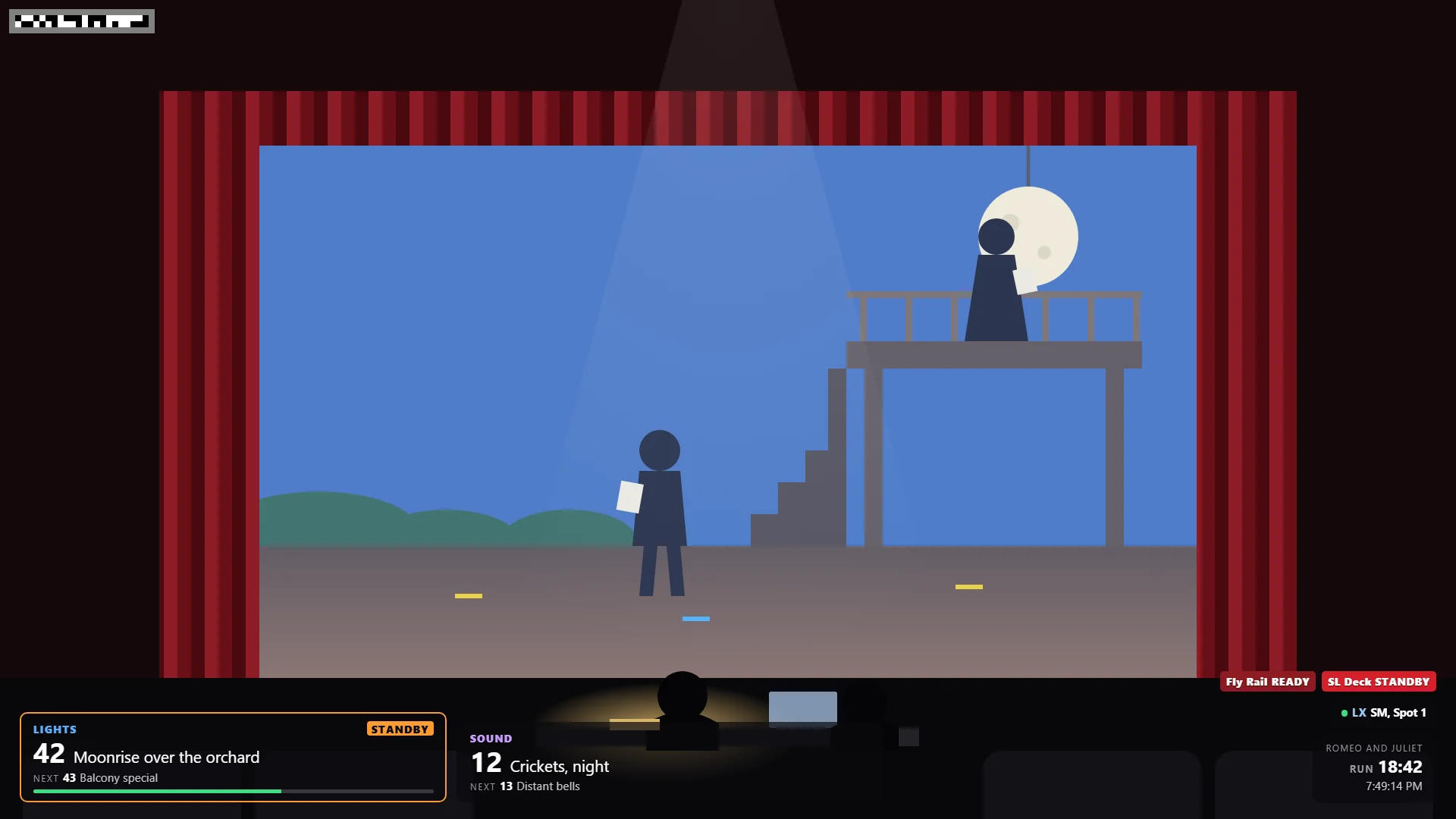
Record on any camera: the booth, a phone in the balcony, a camcorder on the deck. Afterwards Go2Cue lines it all up with every cue and every rehearsal note, by itself. Click a note, and the playhead jumps to that moment. No more scrubbing through footage.
Record the way you already do. Using OBS? Go2Cue adds a live overlay of the cues, and can start the recording for you.
LIVE DEMO · press ▶, or click any cue or note
LIGHTS—SOUND—FLY RAIL—RUN 0:00:00
0:00 / 4:00
✓ Synced by matching its sound · Tech 2, Act 2 Scene 3
CUES AND NOTES
After the rehearsal, Go2Cue lines every recording up by itself, four ways:
It uses whichever it finds first, for each camera on its own. No clapper, no timecode, no fiddling in an editor.
With OBSConnect OBS once, in Settings (OBS connection), and Go2Cue starts each recording with the run timer, so it knows the moment it began. Start and Stop recording are there too.
The overlayThe overlay in OBS puts a time stamp in every frame, beside the cues. Trim it or re-export it and it still lines up.
A digital slateAny camera, even a phone: hold up the digital slate, on another phone, for a few seconds.
The soundTurn Listening on once, in Settings: Go2Cue matches any camera's sound to what the stage manager's computer heard, to within a frame. Nothing to do on the night.
The overlay, in OBS
The cues, on the recording.
Go2Cue puts the overlay on your OBS picture for you: each desk's cue and NEXT, the standbys, who's talking, and the run time, in every recording.
The squares in the corner are a time stamp that lines the video up later, however it's cut.
Every note, at its moment
Every note sits on the timeline where it was taken: "42 is too blue" opens on cue 42.
0:48DIRECTORJuliet: cheat out on the balcony line.
1:25LX42 is too blue. Warm the cyc.
2:05SMFly cue late: call it on the breath.
Every cue, as it ran
Every GO and standby is on the timeline too: check the call against the picture.
0:31LIGHTS42 · Moonrise
0:31FLYGO · Moon in
1:10SOUND12 · Crickets fade
Every camera, the same notes
Add every camera's recording: each lines itself up, and you switch cameras at the same moment.
BOOTHOBS · lined upBALCONYphone · by its soundDECKcamcorder · by the slate+ ADD A VIDEO
Share it on Google Drive
Put the rehearsal on Google Drive with its cues and notes. The director opens it at home, already lined up, and adds notes of their own.
☁ GOOGLE DRIVETech 2 · 3 videos · 41 notesDIRECTORopened it at home
Subtitles too: the cues as a subtitle file beside any recording, for VLC, QuickTime or YouTube.
The notes come first: no camera? Rehearsal notes work on their own, straight to a Google Sheet.
Your video stays yours: it stays on your computer unless you put it on your own Google Drive.
Try it on your next show.
Free forever for one station and one desk: yours to keep, not a trial. The 30-minute demo of everything needs no card.
 Notes
Notes