

Go2Cue
Cues
Universal cue trigger · Cues Lite and up

One GO. Every desk.

Lighting, sound and video from the same GO, at the same moment, with the crew's cue lights. No more "lights, sound, video... GO" to three operators.
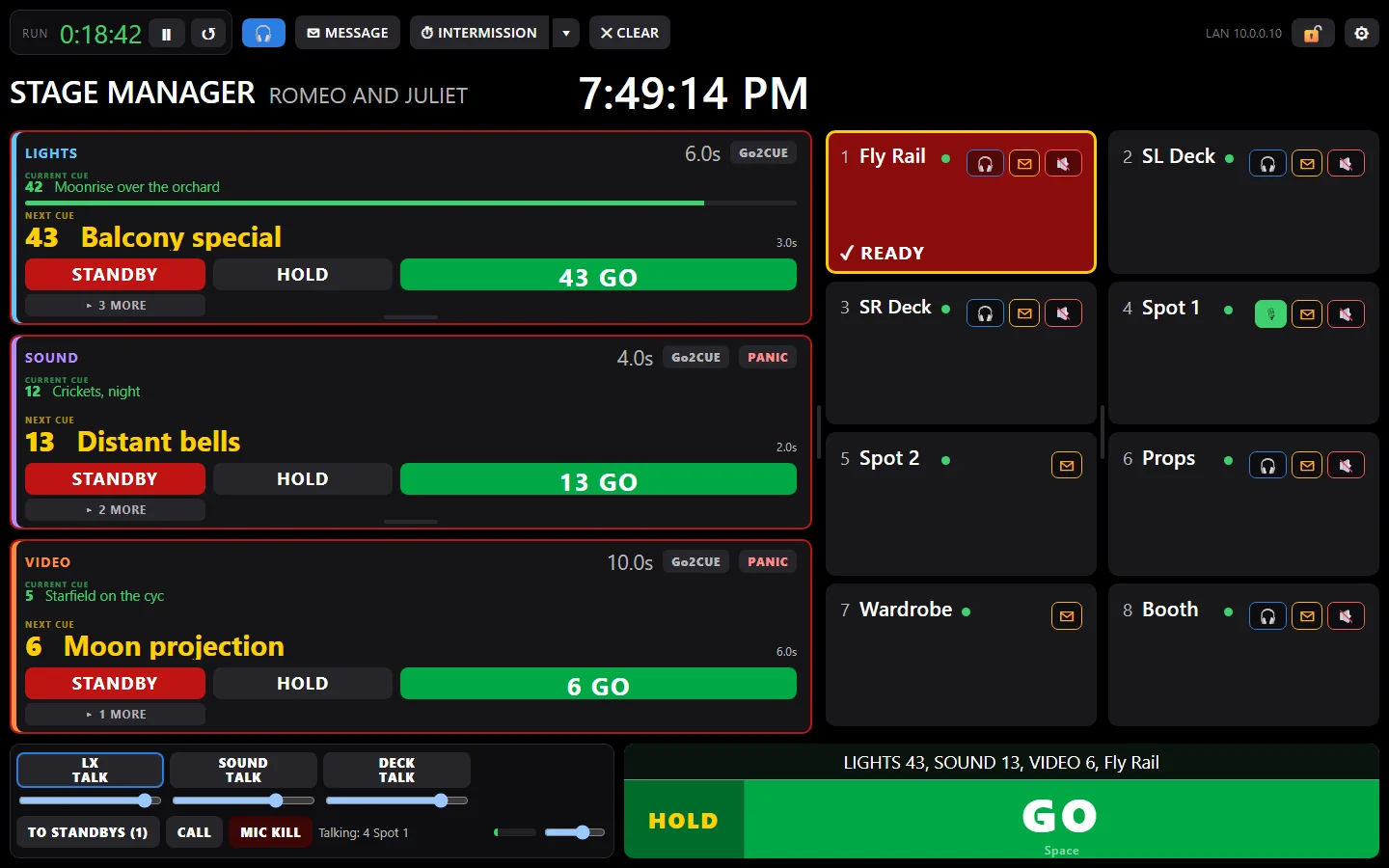
The Go2Cue stage manager screen with LIGHTS, SOUND and VIDEO on standby: one GO runs LIGHTS 43, SOUND 13 and VIDEO 6Each desk the cue needs, on standbyWhat's next on every deskHOLD stops the cue on the deskOne GO: LIGHTS 43, SOUND 13, VIDEO 6, and Fly Rail
  1. Each desk the cue needs, on standby
  2. What's next on every desk
  3. HOLD stops the cue on the desk
  4. One GO: LIGHTS 43, SOUND 13, VIDEO 6, and Fly Rail
LIGHTS, SOUND and VIDEO on standby: the one GO runs LIGHTS 43, SOUND 13 and VIDEO 6, and stands Fly Rail by.

Every kind of desk

Eos and Nomad, grandMA3 and grandMA2, QLab, X32 and M32, WATCHOUT 7, Isadora, and anything that speaks OSC. More coming.

EOSlightingGRANDMA3lightingGRANDMA2lightingQLABsoundX32sound deskQLABvideoOSCResolume, MagicQ…

What's next, on every screen

Each desk's running cue, its fade, and NEXT, on every screen, in its department's color.

2.4sLIGHTS42 · Moonrise · NEXT 43
0.0sSOUND12 · Crickets · NEXT 13

Hold, and the cue stops

HOLD stops a running cue where it is, on the desk itself, and every screen shows it held.

GO HOLDstops it thereBACKcue lists

Or let the operator GO

Turn triggering off for a desk: its cues still show live, and you cue the operator like the rest of the crew.

LIGHTStriggered by the SMSOUNDview only · op takes GO

Cues Free shows one desk's cues live on your screens. Triggering, and more desks, come with Cues Lite (2 desks) and Cues Pro (16).

The other way round · Cues Pro

Let the lighting console cue the crew.

Give each cue light a DMX address and it's one more channel on the console: program it into the light cues, and the crew is stood by and sent with the lights.

  1. Patch a spare address for each station. 1/497 for the Fly Rail, 1/498 for SL Deck: any free addresses, on any universe.
  2. Bring it up past 50% in a cue and that station flashes STANDBY. Take it to 0 in the next cue and that's its GO.
  3. Levels can send messages too. One address at 10% sends "Five minutes, please", at 100% "Hold please", to everyone or one station.

Any console that sends sACN, Eos and grandMA3 included. You still see every standby and every READY.

1/497FL→FLY RAILSTANDBY
1/49800→SL DECKGO
1/499FL→SPOT 1READY
1/50010→EVERYONE"Five minutes, please"
CUE 42 · on the lighting console
How it connects

Everything meets at the stage manager.

Call from the laptop, a keyboard, a MIDI controller or a Stream Deck. It runs the desks and cues every crew station.

Asst stage managersA second SM screen, and a one-press take over if the hub fails.
Desks cue the crewAn Eos or grandMA3 cue, or a QLab network cue, can stand stations by and GO them; grandMA2 and other consoles can through sACN, with Cues Pro.
Any console, over sACNDMX over the network: an address per station, up for standby, down for GO. Set levels send messages too. With Cues Pro.
Show filesSave a show; open it next season or on another laptop.
Crew cue listsEach station's own cues: typed in, imported from your cue sheet, or linked to a Google Sheet. A linked sheet updates itself every few minutes, or when you press Update now. Change it mid-show and you choose when it goes in. With Cues Lite and up; a linked Google Sheet with Cues Pro.
Shared stationsTwo boxes on one standby, READY when both answer.
Fail-safeA station that loses Wi-Fi shows NO LINK, never an old cue.
GuideHow every part works: read the guide.

Try it on your next show.

Free forever for one station and one desk: yours to keep, not a trial. The 30-minute demo of everything needs no card.