A complete rehearsal note-taking system. Your notes are done before the lights are out. Speak or type during the run: each note lands on its cue, with the scene and page. The director and every designer take theirs on their own laptops, and it all lands in one Google Sheet.
The whole cue list, live, as the stage manager calls itTap an earlier cue: the next note goes on itHold to speak, or type a noteStamped with the cue that was upIts department: a guess you can changeShared with the SM and the directorSave it, or open the rehearsal video
The whole cue list, live, as the stage manager calls it
Tap an earlier cue: the next note goes on it
Hold to speak, or type a note
Stamped with the cue that was up
Its department: a guess you can change
Shared with the SM and the director
Save it, or open the rehearsal video
The director's Notes desk: the whole cue list as it runs, with cue 40 picked for the next note, and every note stamped with its cue. Each designer gets one of their own.
TECH 2 · NOTES Google Sheet · a tab for each department
19:42SOUNDBells up 3 dB · SOUND 13 · Act 1, Scene 4
19:43DIRECTORJuliet: cheat out on the balcony line · LIGHTS 42
19:44LX42 is too blue. Warm the cyc · LIGHTS 42
19:46SMFly cue late: call it on the breath · FLY 3
On the stage manager’s laptop
Every shared note, beside the show.
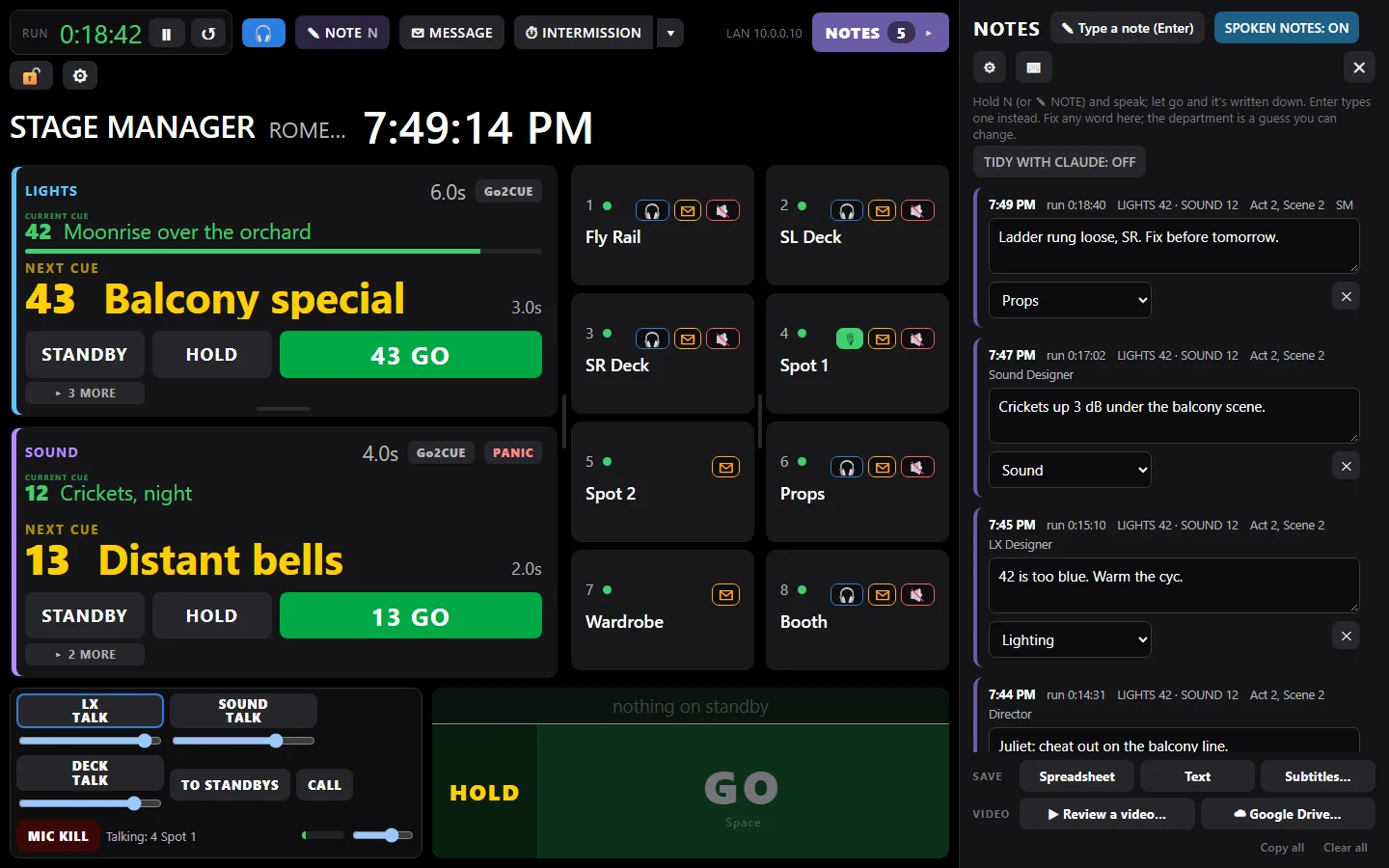
Hold N and speak, or press Enter and typeStamped: the clock, run time, cues and sceneIts department: a guess you can changeWho took it: the SM or a Notes deskSave it, send it, or review the video
Hold N and speak, or press Enter and type
Stamped: the clock, run time, cues and scene
Its department: a guess you can change
Who took it: the SM or a Notes desk
Save it, send it, or review the video
The notes beside the show: every note stamped with the clock, the run time, the cues and the scene, from the stage manager and every Notes desk.
Type it, or say it
Press Enter and type, or hold N and talk: it's written down when you let go. Or put NOTE on a foot pedal. Speech stays on the laptop.
1:25LX42 is too blue. Warm the cyc.
A Notes desk for everyone in the house
The director and each designer see the cues as they run, and take notes under their own name. Tap an earlier cue to put a note on it.
DIRECTORrow G, house leftLX DESIGNERtech tableSOUNDtech table
One Google Sheet for everyone
Press Send: every shared note in order, with its cue, and a tab for each department. Or save a spreadsheet or text file.
☁ GOOGLE SHEETTech 2 · 41 notesLXtabSOUNDtabDIRECTORtab
Each actor gets their own notes
"Juliet, cheat out" goes to the actor playing Juliet. One click, and every actor gets one email with just their notes. Replies go straight to you.
JULIET4 notesROMEO2 notesNURSE1 note
You choose who sees it
Each desk shares with everyone, with just the stage manager and director, or with nobody.
EVERYONE SM AND DIRECTOR NOBODYstays on this laptop
Tidy with Claude: spoken notes turned into clean sentences, sorted by department.
Your notes stay yours: speech never leaves the laptop. Notes go only to the people you share them with and your own Google Drive, and, if you turn tidying on, their words to Claude to be tidied.
Recorded the rehearsal?Video notes review puts every one of these notes on the video, at its moment.
Then watch it back
Every note, on the video.
Record on anything, with no setup before rehearsal: Go2Cue lines the video up with every cue and note afterwards. Click a note, and the playhead jumps to that moment. No more scrubbing through footage.

 Notes
Notes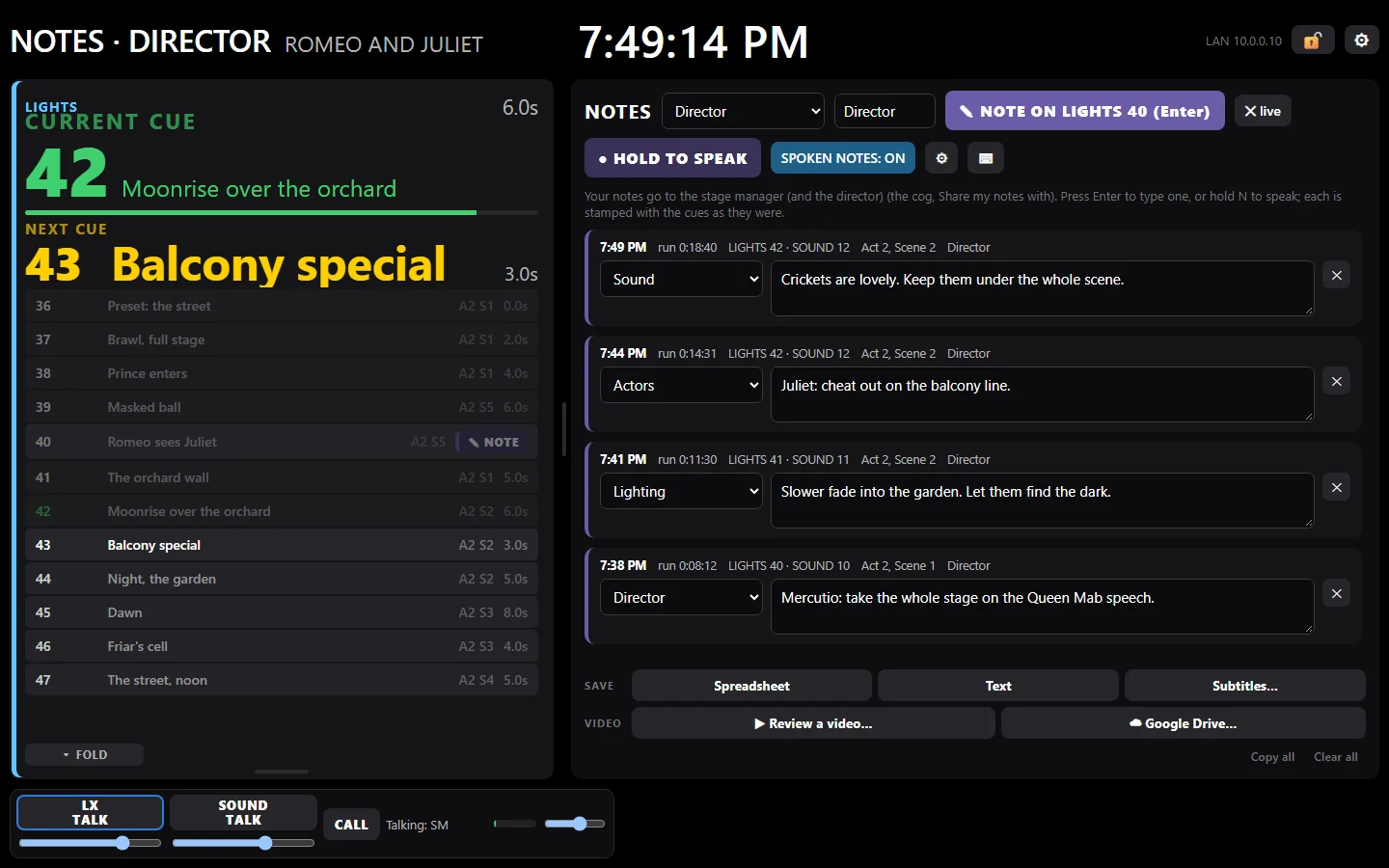 The whole cue list, live, as the stage manager calls itTap an earlier cue: the next note goes on itHold to speak, or type a noteStamped with the cue that was upIts department: a guess you can changeShared with the SM and the directorSave it, or open the rehearsal video
 Hold N and speak, or press Enter and typeStamped: the clock, run time, cues and sceneIts department: a guess you can changeWho took it: the SM or a Notes deskSave it, send it, or review the video