Go2Cue
For theatre · Windows and Mac · iPhone and iPad stations

Cue the crew.
Run the show.
Skip the late-night notes.

Cue lights that tell the crew what's coming, headset coms, and rehearsal notes that write themselves, on the laptops, iPhones and iPads you already have.

Free foreverThe basics are yours to keep. Add only what your theatre needs.
Cues

Not just a light. The cue.

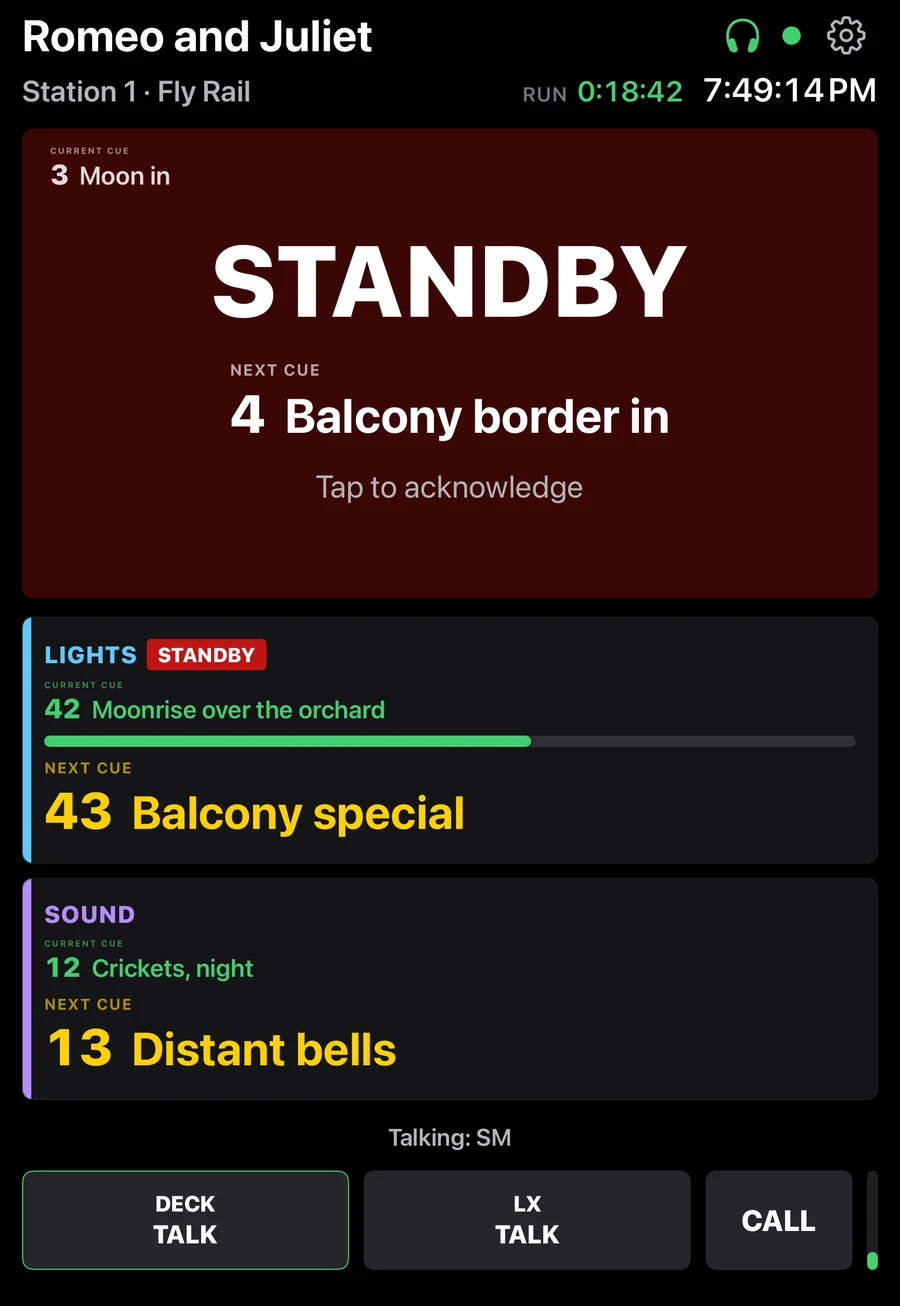
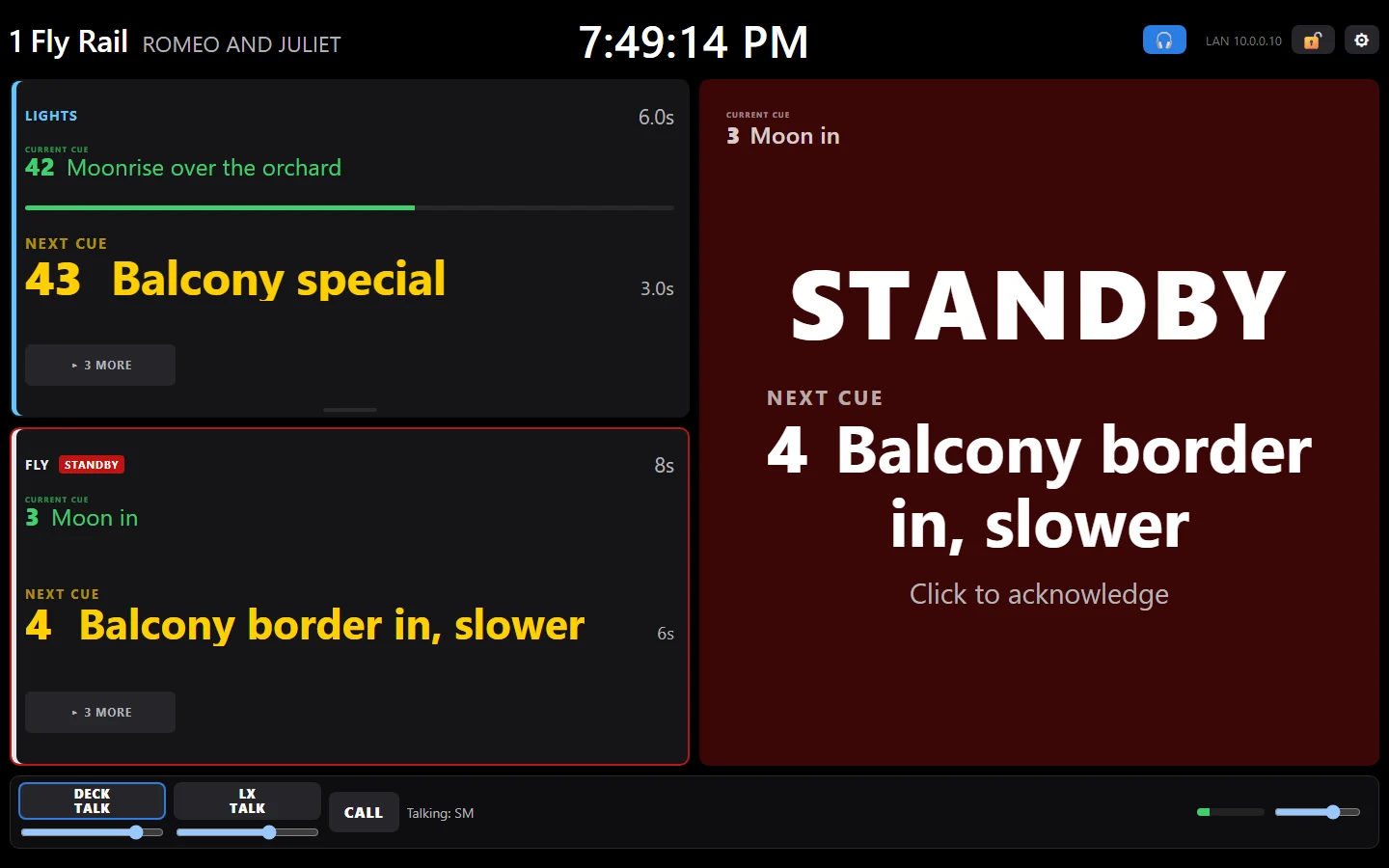
Every crew position sees the cue number, what it is, and what's next. Standby flashes until they tap READY, and you see who's ready before you say GO.

  • The crew knows what's coming: "FLY 4, balcony border in, slower", not just a red light.
  • Every standby answered: who's ready and who isn't, at a glance.
  • Any screen: an old laptop, an iPhone or iPad, or a $35 touchscreen. No cable runs.

The usual way: a bulb on a wire, and "fly rail, are you there?" on headset.
Cue lights →

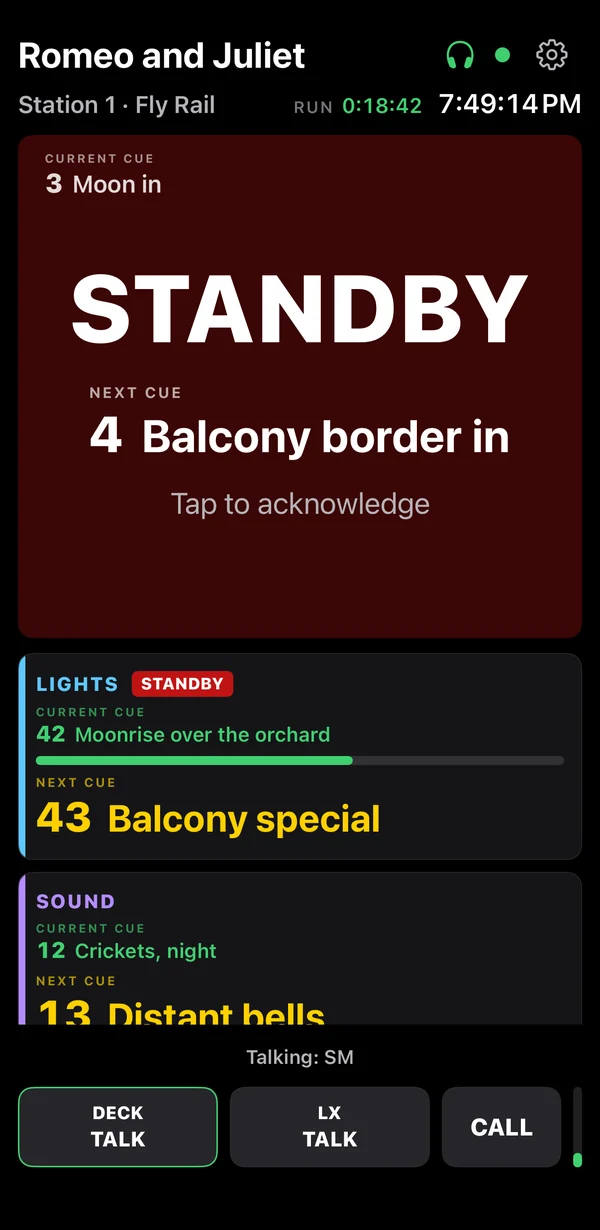
The fly rail's crew station on standby: STANDBY, and the next cue big, 4 Balcony border in, slower
One more thing

Your GO runs lighting, sound and video.

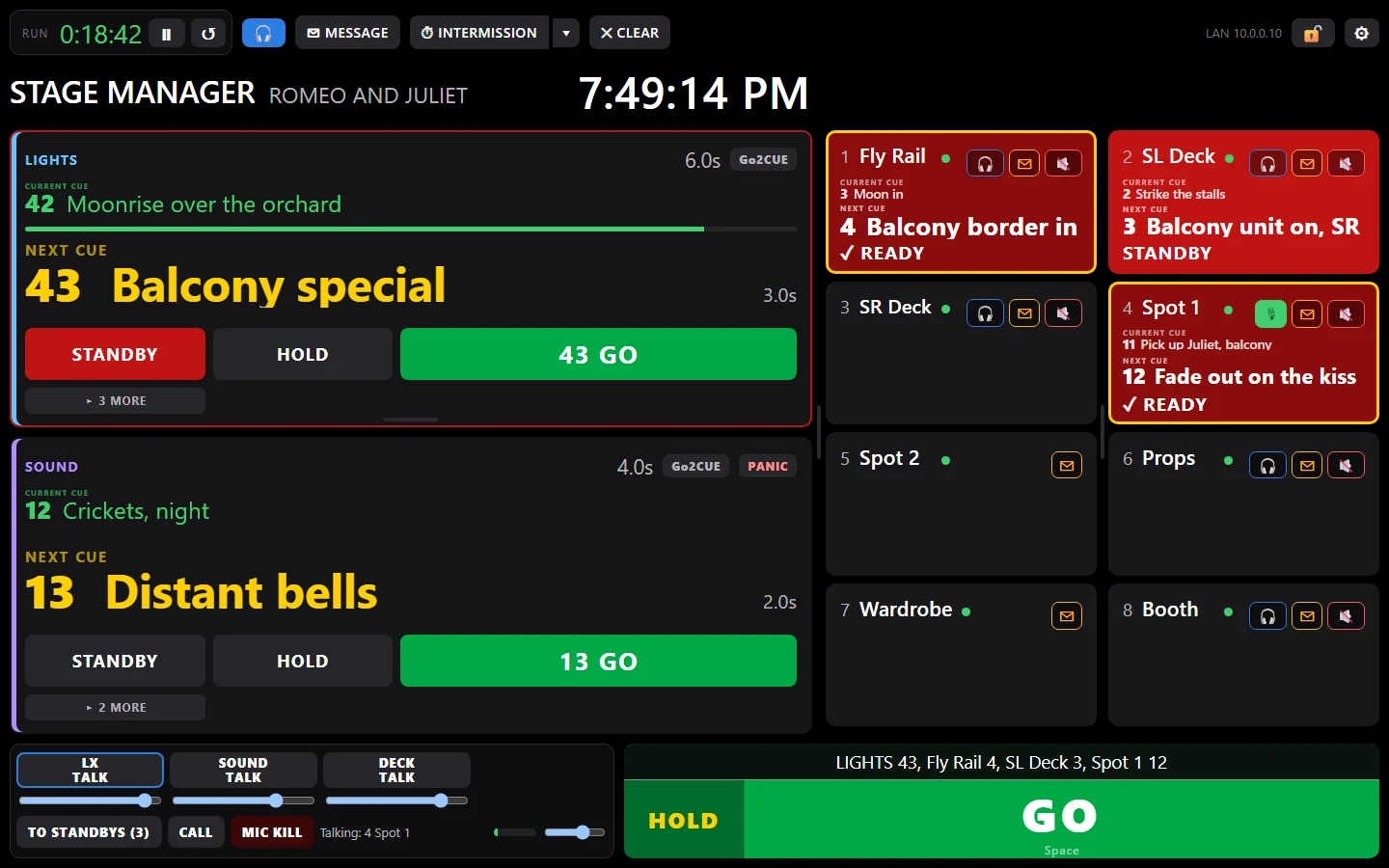
The stage manager's screen shows the cue every desk is in, and what's next, live. One press and lights, sound and video GO together, or let each operator take their own.

EosgrandMA3grandMA2QLabX32 · M32WATCHOUTIsadoramore coming soon

The usual way: "lights, what cue are you in?", three people on three screens, and the stage manager guessing.
One GO, every desk →

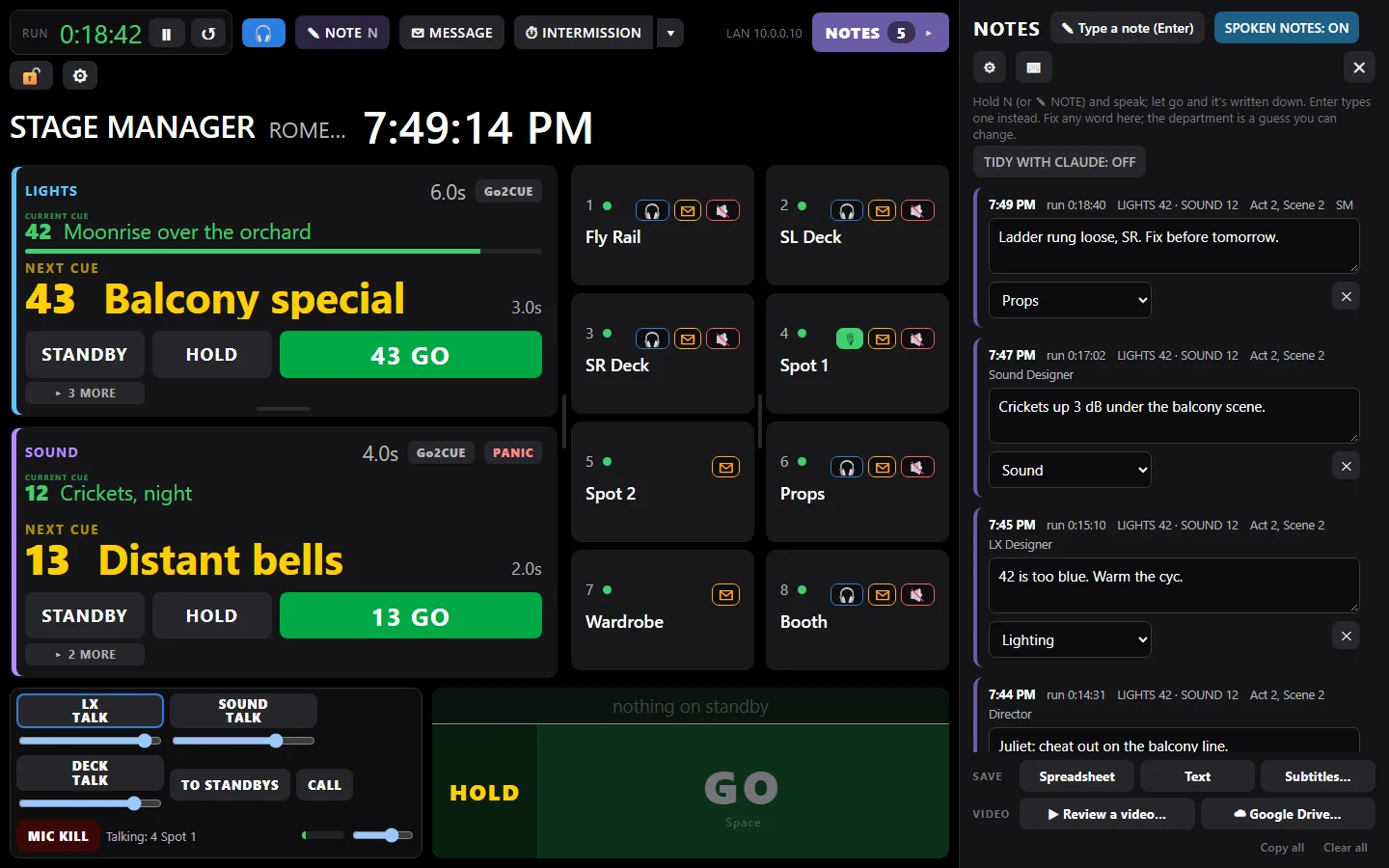
The stage manager's screen: lighting on 42 with 43 Balcony special next, sound on 12 with 13 Distant bells next, the crew stations on standby and ready, and one big GO
Coms

The stations are the coms.

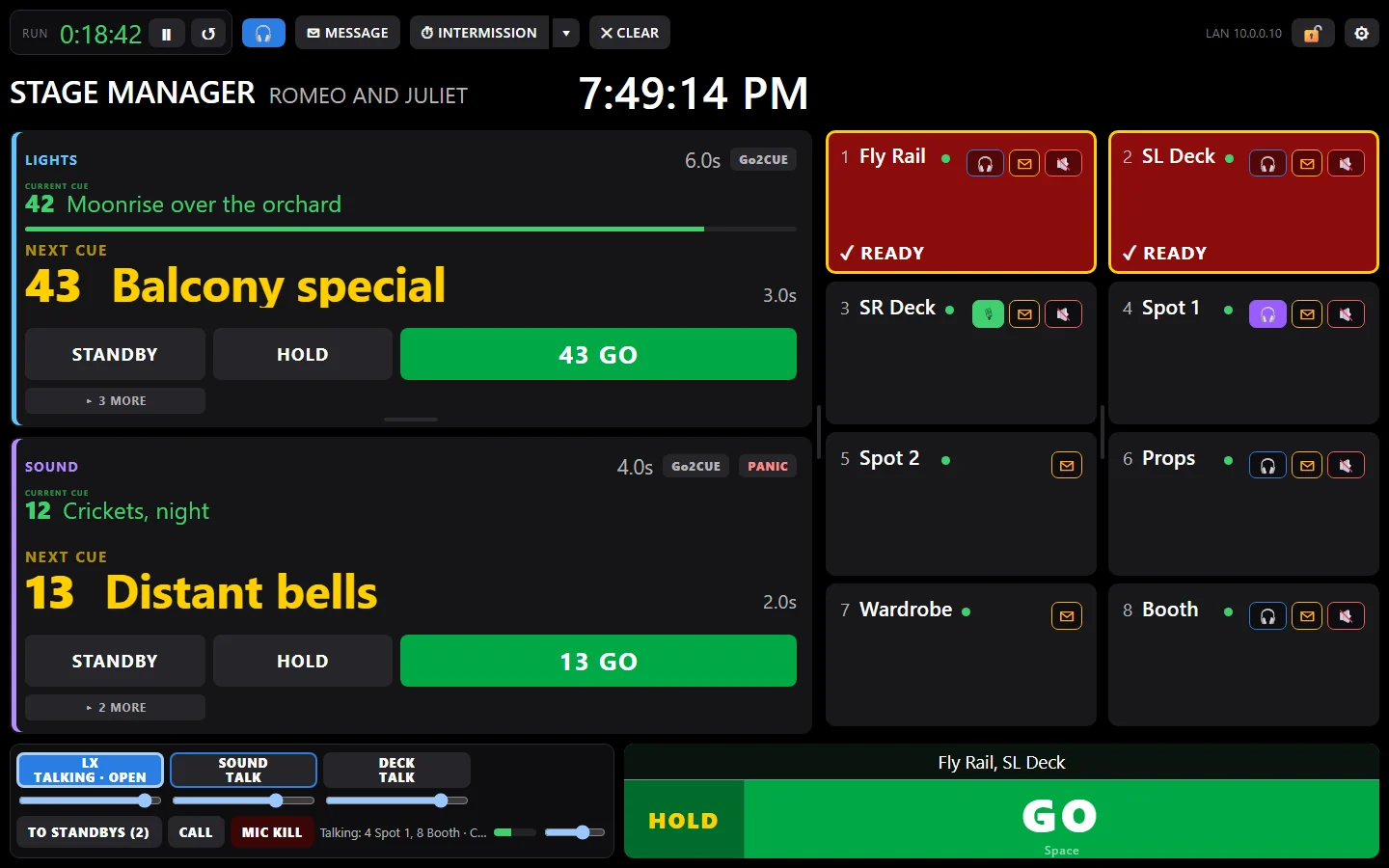
Plug a headset into any Go2Cue laptop, iPhone or iPad. It's tied into the cueing, so one key talks to whoever is on standby. A party line or your own channels, call buttons, and a mic kill.

  • No beltpacks, no base station: the devices you have are the coms.
  • Talk to the standbys: one key, and only the crew on standby hears you.
  • Your talkback is free: your voice in every headset, on every plan.

The usual way: around $1,000 per wireless beltpack, a base station, and a separate system that knows nothing about your cues.
Coms →

The stage manager's screen with coms on: talk keys for LX, sound and deck, talking to the stations on standby, who's talkingAn iPhone as a crew station
Notes

No more late-night rehearsal notes.

A complete rehearsal note-taking system. Your notes are done before the lights are out. Speak or type during the run: each note lands on its cue, stamped with the scene and page, sorted by department.

  • Hold a key and talk: it's written down. The director and every designer take notes on their own laptops too.
  • Film it on anything: Go2Cue lines the video up with your notes afterwards. Click a note, and the playhead jumps to that moment.
  • Each actor gets their own notes, by email, in one click.

The usual way: two hours typing up notes after every rehearsal, an email to each actor, and scrubbing through the video to find the moment a note was about.
Rehearsal notes → Video review →

Rehearsal notes beside the show: each note with its time, the run time, the lighting and sound cues and the scene, and who took it
What it replaces

Less gear. Fewer late nights.

Cue lightsA wired cue light system: often thousands, plus the cable runsOn the screens you have. Free for one station.
Headset comsAround $1,000 per wireless beltpack, plus a base stationOn the same stations, from a Coms part.
Rehearsal notesAn hour or two of typing and emailing after every rehearsalDone during the run, sent in minutes.
Finding it on videoScrubbing through hours of footageClick the note. You're there.
Pricing

The basics are free, forever.

Add only what your theatre needs. No subscription.

Free
$0for good

A real cue light for one crew station, with one desk's cues live. Messages, countdowns, your talkback. Not a trial, no card.

Rent it for your show
from $2a day

Any part, for just the run. Every dollar you pay counts toward owning it.

Own it
from $129a part

Cues, Notes or Coms, Lite or Pro, yours for good with a year of updates. All three from $299.

Get Go2Cue

One app for the stage manager and the crew, on Windows and Mac, and the Go2Cue Station app for iPhone and iPad.

Beta testers: download Go2Cue for Windows and Mac, and the Stream Deck plugin, from your account (sign in with the email you applied with).

BETATry it before it goes on saleApply to run Go2Cue on your next show: tell us about your theatre.

Go2Cue goes on sale soon

Make your free Go2Cue account now and we’ll email you once, when it goes on sale. We will never sell, give away, or spam your email. We hate that too.

Windows

Go2Cue on a Windows laptop: the stage manager's screen, the lighting and sound desks' cues on the left and the crew stations on the right

Windows 10 and 11.

Coming soon

Mac

Go2Cue on a Mac as the fly rail's crew station, on standby: the current cue small in the corner, STANDBY and the next cue big

macOS 11 or later, Apple Silicon and Intel.

Coming soon

iPhone and iPad

An iPad as a Go2Cue crew station, on standby: STANDBY and the next cue big, the current cue small in the cornerAn iPhone as a Go2Cue crew station, on standby: STANDBY and the next cue big, the current cue small in the corner

Crew stations and coms, on iPhone 8 and iPad (2017) or newer.

With beta testers now

Station boxes

A $35 Waveshare touchscreen you buy yourself (we don't sell hardware), set up from the app.

Coming soon
Stream Deck

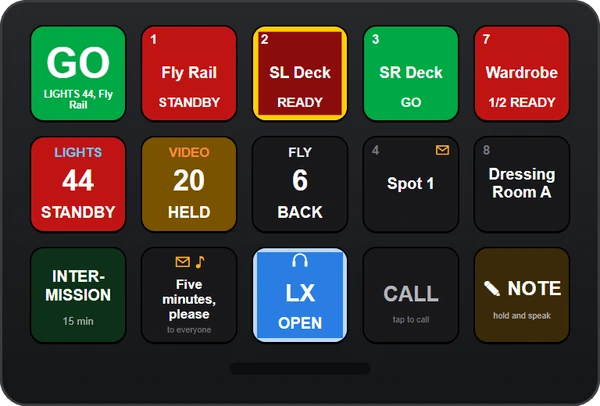
A Stream Deck with the Go2Cue plugin's keys: GO, crew stations on standby, ready and GO, the lighting feed on standby, a held video cue, intermission, a message, a coms talk key and NOTE

GO, standbys, coms and a NOTE key, on an Elgato Stream Deck.

Coming soon